
999V Login

Why Does Your 999V Login Matter?
Your 999V login protects your wallet, your winnings, and your linked JazzCash or EasyPaisa account. 999V Game is a new earning app where every balance sits behind one simple sign-in screen. So, a forgotten password or a typing mistake can lock you out of real money. Many Pakistani users face this problem right after they install the app or change phones. This guide answers every common login question in clear, simple steps.
First, you will learn what the 999V login actually involves and what details it needs. Next, you will follow the exact steps to sign in and reset a lost password. After that, you will find practical tips that prevent errors and keep your account secure. Finally, the FAQs cover real problems users report when they try to log in.
What Is 999V Login?
999V login is the sign-in process that opens your game account using your mobile number and password. You create these details once during registration, then use them every time you play. The app does not ask for an email or social media account at this stage. Instead, your registered Pakistani number acts as your username. Your password then confirms that the account really belongs to you.
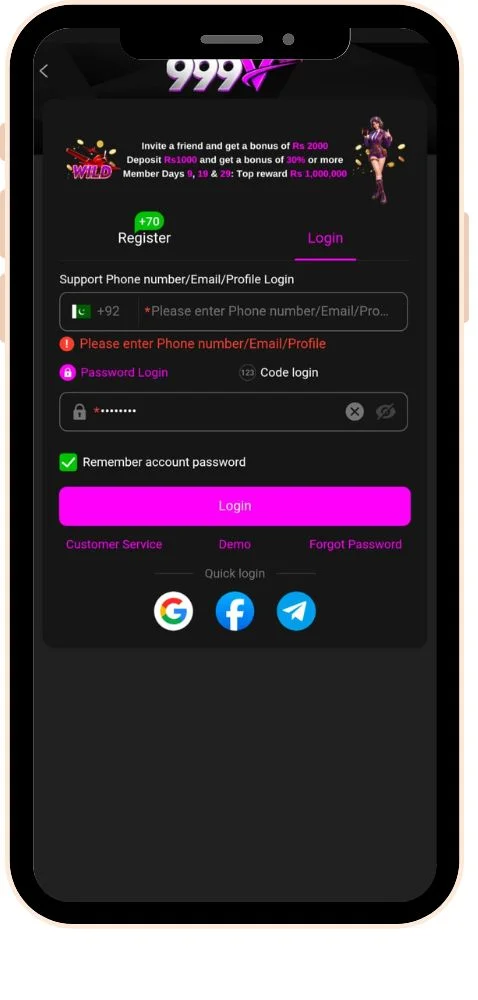
Besides the login password, 999V also uses a separate withdrawal PIN. The password opens your account, while the PIN approves any money leaving your wallet. Therefore, even someone who learns your password still cannot withdraw without that PIN. Moreover, the app sends a one-time SMS code when you register or reset your password. Together, these three layers make the login process simple yet reasonably secure.
How Do You Log In to 999V?
Open the app, tap Login, enter your registered mobile number and password, and tap Login again. The whole process takes less than a minute on a stable connection. Follow these steps in order.
Steps to Sign In
- Open the 999V download app on your Android phone.
- Tap the Login button on the home screen.
- Enter the mobile number you used during registration.
- If the field already shows +92, type your number without the leading zero.
- Type your password carefully, checking capital and small letters.
- Tap Login and wait for the game lobby to load.
- Check your wallet balance to confirm you are in the right account.
Steps to Reset a Forgotten Password
- Tap Forgot Password below the password field.
- Enter your registered mobile number.
- Tap Get Code and wait for the SMS to arrive.
- Type the one-time code into the verification box.
- Create a new strong password and confirm it.
- Tap Submit, then sign in with your new password.
Quick Fixes When Login Fails
- “Account does not exist”: Check the number format and make sure you used the registered SIM.
- OTP not arriving: Wait two minutes, clear old messages, and tap Resend.
- App stuck on loading: Switch between Wi-Fi and mobile data, then try again.
- Login fails after an update: Download the latest APK from the official website.
- Account locked: Wait for the lock to expire or contact in-app support.
Which Tips Keep Your 999V Login Safe?
Use a strong password, keep your OTP private, and install only the official APK. These simple habits stop most login errors and account thefts. Follow them every time you sign in.
- Keep your password unique and never reuse it on other apps.
- Use a different code for your withdrawal PIN than your login password.
- Never share your OTP, even with someone who claims to be 999V support.
- Download only the official APK, because fake versions can steal login details.
- Keep your registered SIM active, since password resets depend on it.
- Avoid public Wi-Fi when you log in or request a withdrawal.
- Untick Remember Me on any phone that other people use.
- Stick to one account per person, as multiple accounts can trigger a freeze.
- Change your password immediately if you notice activity you did not make.
Is 999V Login Easy for Everyone?
Yes, the 999V Game login process stays simple for anyone who registered with an active Pakistani mobile number. You only need your number, your password, and the latest version of the APK on your phone. Moreover, the Forgot Password option lets you regain access quickly through a one-time SMS code. Most sign-in errors come from small details like number format, caps lock, or an outdated app. Fixing those details usually takes only a few minutes and rarely needs help from support. In short, a little care at the login screen saves you a lot of stress later.
Still, your login details guard a real money app, so security should always come first. Keep your login password and withdrawal PIN different, strong, and completely private at all times. Additionally, download the APK only from the official website to avoid fake copies that steal accounts. Treat every OTP like cash, because anyone who has it can take control of your account. If a problem continues, contact in-app support with your number and a clear screenshot of the error. Above all, play within your limits and remember that every round on 999V carries real financial risk.
FAQs
Your number format probably does not match your signup details. Remove the leading zero if the field already shows +92.
No, 999V uses your registered mobile number and password for sign-in. Email and social media login are not the standard method for this app.
No, your balance stays on your account, not on your phone. After reinstalling the official APK, log in with the same number and password.
Recover your old number first through your network’s duplicate SIM service. Without that number, reset codes cannot reach you.
Your account is probably opening on another device at the same time. An outdated app or cleared phone data can also end your session.